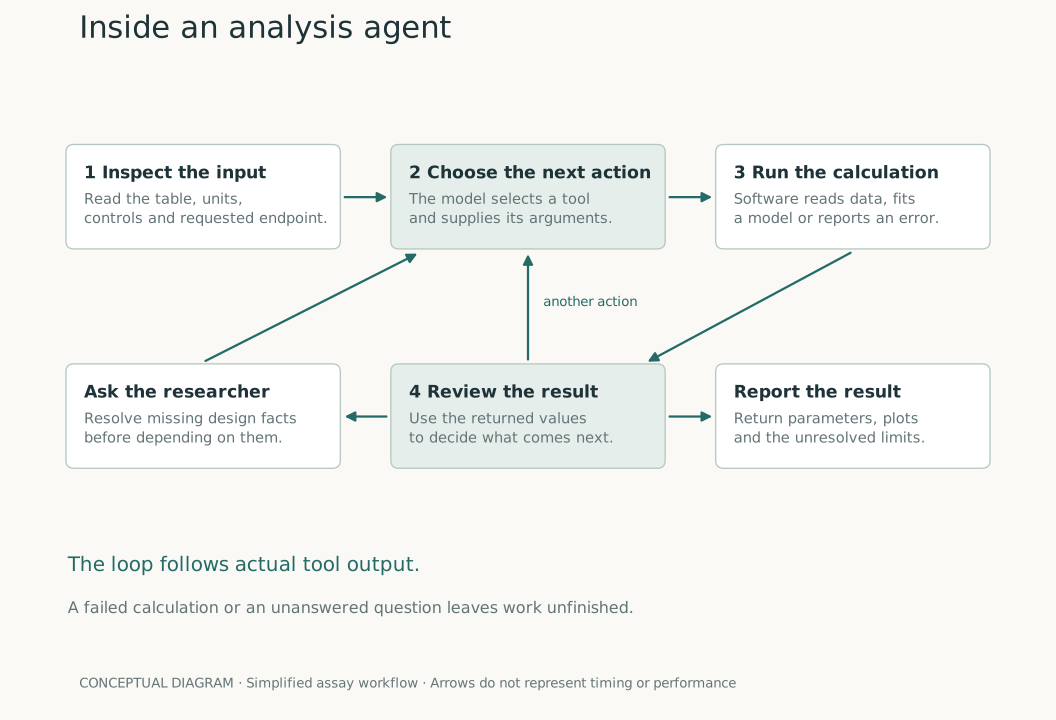
You attach a spreadsheet and ask for a Michaelis–Menten fit. The software needs to find the relevant sheet, identify concentration and rate, separate the conditions, run the fitting routine, and return a result. If a column is ambiguous or the fit fails, it needs a way to handle that before continuing.
An analysis agent uses a language model to choose those next actions. The model can request a tool or write code that calls one. The surrounding software executes the action and returns what happened. The model then has another decision to make.
That loop is what “agentic AI” means in this article. It gives the model some control over the sequence of work. The numerical result still needs to come from a calculation on the supplied data.
The basic loop
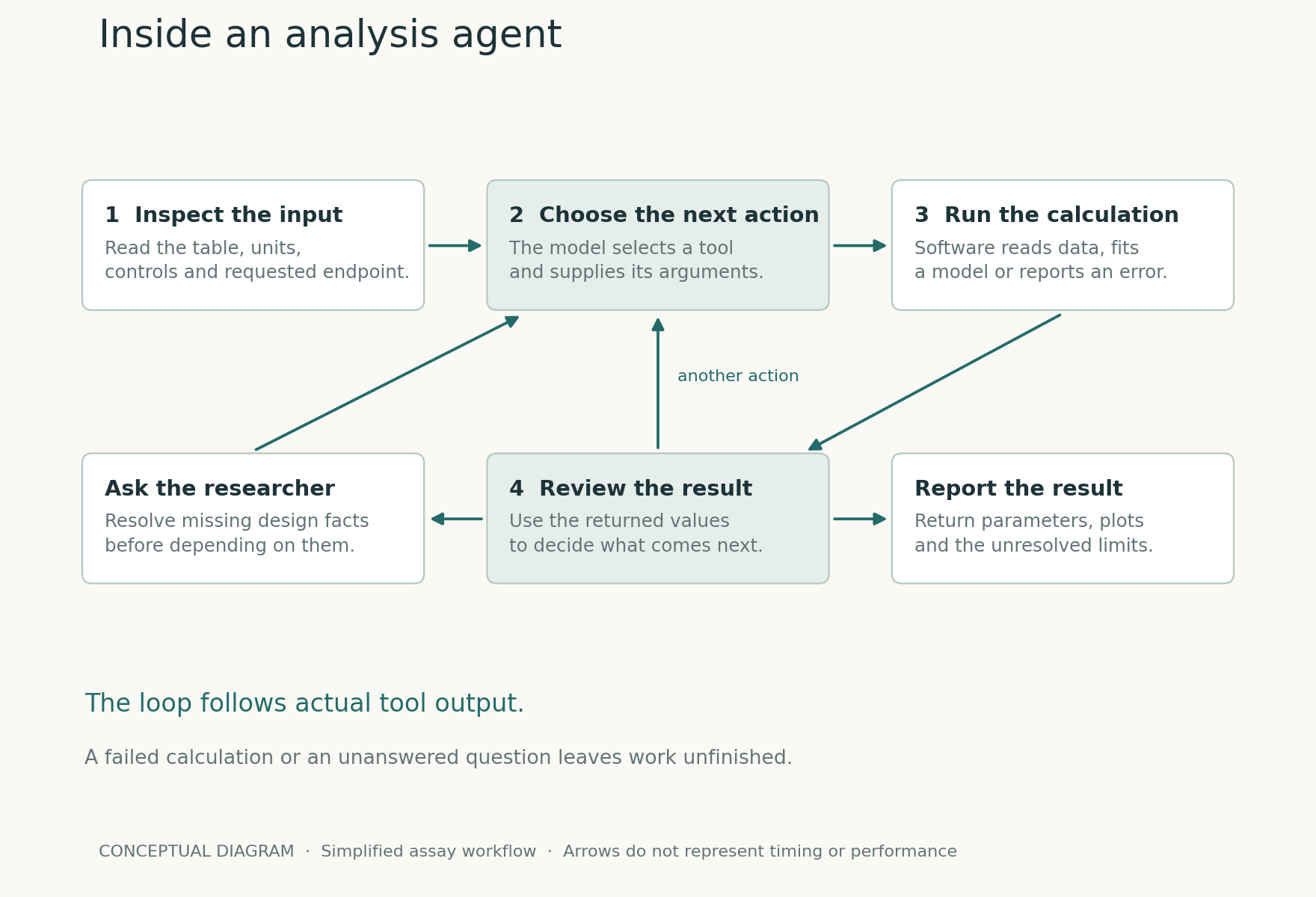
Hugging Face describes an agent as a program in which model outputs influence the workflow. In a multi-step system, each action returns observations that become part of the context for the next action. Its smolagents library supports actions expressed as Python code as well as named tool calls. [1]
The ReAct research paper explored interleaving model reasoning with actions that retrieve information or interact with an environment. It is useful background for understanding the loop. The paper’s benchmark results do not validate a lab-analysis application or establish the accuracy of an assay fit. [2]
Follow a spreadsheet through the system
In Gradiance’s assay implementation, the agent has tools for listing workbook sheets and reading uploaded data. It also has fitting tools for tasks such as dose response, standard curves, binding, and enzyme kinetics. Python connects the steps: select the relevant rows, assemble the arrays, call the routine, and use the returned values.
For the kinetics request, an appropriate first action would be to inspect the table. Suppose it contains concentration_ppm, rate, and condition. The agent can identify the condition labels, check the number of observations, and prepare separate inputs. The rate unit still needs to come from the supplied record.
Next it can call a fitting tool with the substrate concentrations, measured rates, and selected model. Gradiance’s enzyme-kinetics tool returns quantities including Vmax, Km, fit diagnostics, warnings, and parameter intervals when available. The model can use those outputs in the next step; it does not need to estimate a plausible Vmax in prose.
The distinction is visible when you inspect a run. A statement such as “I will fit each condition separately” describes an intended action. The calculation’s returned values show whether that action produced a result. You need the latter to support a numerical claim.
A question can be the next action
Suppose the concentration column contains −9, −8, and −7. Those values might be log10 molar concentrations. They might also be transformed values with a different meaning. Converting them to concentrations without confirmation could change the entire x-axis.
The agent should first inspect the available headers, metadata, and request. If they do not resolve the ambiguity, a focused question is appropriate: “Does this column contain log10 concentration in mol/L?” Once confirmed, the conversion and its units can be carried into the analysis.
Gradiance provides a user-question tool for this kind of clarification. Its assay instructions call for questions when missing units, controls, pairing, replicate identities, or endpoint definitions would change the analysis. That is a description of the intended behavior in the implementation; the actual run still needs to be checked.
Questions about design have a different role from routine formatting. An assistant can choose a readable legend position without knowing how the samples were collected. It needs experimental information to decide whether two measurements are paired.
What happens when a tool fails?
A fitting routine can return an error, a warning, or parameters that are weakly determined. The next step depends on the problem. A nonnumeric cell may require checking the imported rows. An unobserved plateau may require a more limited report or another experiment. Repeating the same fit with more iterations will not necessarily help.
There is also a stopping rule. An agent cannot keep trying indefinitely. Gradiance’s assay runner has a step limit and records failures or incomplete work when that limit is reached. A run that has already produced some fits may retain them with an incompleteness warning; one with no reported fits is handled as a failure in that path.
That behavior matters for multi-sheet requests. If you asked for eight datasets and the result contains six, inspect the missing two. A readable report for the completed subset does not answer the original request in full.
How calculated values reach the page
The assay agent reports fitted results through a structured reporting tool. It supplies the dataset label, model, parameters, source points, diagnostics, and narrative. When reported fits are present, the backend assembles the result from those records and validates its structure before saving it.
For supported equations, the reporting path can reconstruct a smooth curve from the supplied parameters and cross-check R². These checks catch particular inconsistencies. They cannot establish that the right donors were paired or that a treatment label was accurate; those facts sit upstream of the numerical calculation.
A reader should therefore be able to follow the same chain in reverse: from the figure to its parameters, from the parameters to the fitting method, and from the fitting method to the rows and design choices used as inputs. Our guide to checking AI-generated analyses walks through that review.
Where this flexibility earns its place
An agent is useful when the next action depends on what it discovers: a workbook has unfamiliar sheets, a result needs a follow-up calculation, or a missing fact requires a question. A stable routine with fixed inputs and agreed methods may be better served by a conventional script or template. The question is how much of the sequence needs to adapt.
For lab work, a sensible division is to let the agent help navigate the analysis while preserving explicit decisions about the experiment. It can carry units through a calculation once they are known. It cannot recover unrecorded experimental facts simply by taking more steps.
This description was checked against Gradiance’s assay implementation on September 8, 2026. It is a simplified account of that code, not a claim that every deployment or workflow behaves identically. The flow-cytometry workspace has a separate agent and analysis path. For the assay interface, see the run workspace guide.
Sources and diagram
The diagram is an original explanation of the workflow. Its SVG and rendering script are available with the series reproduction notes.
- Hugging Face. What are agents? smolagents documentation. Accessed September 8, 2026.
- Yao S et al. ReAct: Synergizing Reasoning and Acting in Language Models. ICLR 2023. arXiv:2210.03629.